Tuesday, 15 November 2016

test class best practices in salesforce

Test class best practices in sales-force:


• we need to use System.assert / System.assertEquals in the test. How would you know you are             getting  what is expected from the test? There have to be assert statements.
• we need to avoid @isTest(seeAlldata = true) ?
        we have to setup our own data for testing purpose and should not rely on the Org data.
• Provide a description of what you are test is doing(comments).
• we need have setup method for all your data creation.
• we should test for both positive and negative scenarios.
• Tests are run as System Administrator only, is this how we do in the real system also? If not test        users needs to be created and by using  System.runAs () it has to tested as appropriate.
•     we should have only what exactly you are testing in between  Test.StartTest() and          Test.Stoptest().


Following are applicable for all the test classes.
• The Ideal test class should be somewhat like this

@isTest
public class nameOfTestClass {

// any statics you want to define

// Have your setup methods defined here


/**
* Comments for the test method1
*
**/


static testMethod void testNameOfTheMethod1(){

// All the set up should be here

test.startTest();

// only what you want to test should be here.

test.stopTest();

}
/**
* Comments for the test method2
*
**/

static testMethod void testNameOfTheMethod2(){

// All the set up should be here

test.startTest();

// only what you want to test should be here.

test.stopTest();
}
}

Test Class Best practises


Apex Exception Email

Apex Exception Email:


1.Actually the 'Send Apex Warning Emails' settings on the User record only controls whether or not you get Apex warning emails every time that an Apex scrip surpasses more than 50% of any governor limit.

2.Runtime exception messages (which is what the "Developer script execution" emails are about) always get sent to the 'Last Modified By' user of the Apex class that generates the exception.

3.The only way to disable those emails is to have another user update the Apex class(es) in question. Marking your user record as Inactive in the Org might also work, but I'm not sure.

4.UPDATE: 
This is possible now with the Winter 16 release. Under Setup go to "Apex Exception Email" to specifiy what email(s) you want to receive error messages. Here is an exceprt from the release notes:

Increase Java Heap Space

Increase Java Heap Space:

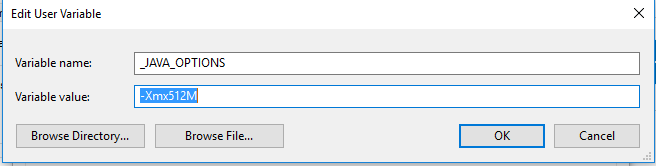
we need to follow below steps to increase Heap Space

1.PC Properties
2.Advanced System Settings
3.Environment Variables
4.System Variables
5.Select NEW.


Java heap space increment

Monday, 19 September 2016

Salesforce ANT Deployment

Prerequisites:


down load ant zip file :apache-ant-1.9.7
and sample package : salesforce_ant_37.0

we will have jar file in salesforce_ant_37.0
copy above jar file and paste in apache-ant-1.9.7 lib file..


In Path settings we need to add JDK and Apache ant file path files.

EX : 1.C:\Program Files\Java\jdk1.8.0_101\bin
     2.C:\Program Files\apache-ant-1.9.7\bin


More info : please check below link.
http://www.mkyong.com/ant/how-to-install-apache-ant-on-windows/

ISCHANGE function


ISCHANGE function..


This function is available only in:
  • Assignment rules
  • Validation rules
  • Field updates
  • Workflow rules if the evaluation criteria is set to Evaluate the rule when a record is: created, and every time it’s edited.


Thursday, 28 July 2016

Approval Process in Sales-force using Apex and Trigger

public void submitForApproval(Opportunity opp)
    {
        // Create an approval request for the Opportunity
        Approval.ProcessSubmitRequest req1 = new Approval.ProcessSubmitRequest();
        req1.setComments('Submitting request for approval automatically using Trigger');
        req1.setObjectId(opp.id);
        req1.setNextApproverIds(new Id[] {opp.Next_Approver__c});

        // Submit the approval request for the Opportunity
        Approval.ProcessResult result = Approval.process(req1);

    }

More info:

http://www.jitendrazaa.com/blog/salesforce/dynamic-approval-process-based-on-the-apex-and-trigger/

Lookup Filters field dependency in sales-force

Lookup Filters field dependency in sales-force

EX :  product family is parent.
           product is child.


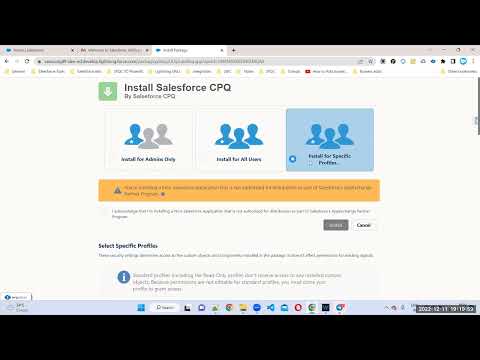
Complete Salesforce CPQ training Free videos

Salesforcestart:: We are excited to announce that our YouTube channel, Salesforcestart, is your one-stop-shop for all things Salesforce CPQ!...